Mastering Visual Engagement: A Guide to Spicy Food Instagram Templates for Posts and Stories
In the vibrant world of social media marketing, few niches are as visually stimulating and universally appealing as spicy food. From the glistening heat of a Sichuan hot pot to the fiery crunch of Nashville hot chicken, culinary content centered around spice captures attention instantly. However, capturing that perfect photo is only half the battle. To truly engage an audience on platforms like Instagram, creators and businesses need a structured, professional presentation. This is where specialized Instagram Post and Story templates become indispensable tools. By utilizing a well-organized design framework, content creators can transform raw photography into compelling narratives that drive engagement, build brand identity, and simplify the creative process.
The Strategic Value of Structured Design in Food Marketing
When scrolling through an Instagram feed, users make split-second decisions about what to stop and view. A chaotic or poorly formatted image often gets skipped, regardless of how delicious the food looks. A well-organized template solves this problem by providing a consistent visual hierarchy. It guides the viewer's eye from the mouth-watering image of the dish to the crucial call-to-action or descriptive text.
For restaurants, food bloggers, and spice brands, consistency is key to building recognition. When every post follows a similar structural logic—using specific color palettes, font pairings, and layout grids—it creates a cohesive brand aesthetic. This professionalism signals to the audience that the business is established and trustworthy. Furthermore, templates allow for rapid deployment. In the fast-paced environment of social media, where trends shift daily, the ability to edit files quickly and easily means you can capitalize on viral moments or daily specials without spending hours on graphic design.
Understanding the Technical Foundation: PSDs and Smart Objects
To fully leverage these design assets, it is helpful to understand the technology behind them. Most high-quality templates are delivered as PSD (Photoshop Document) files. Unlike standard image formats like JPEG or PNG, a PSD retains all the layers, effects, and editable text fields of the original design. This distinction is critical for customization.
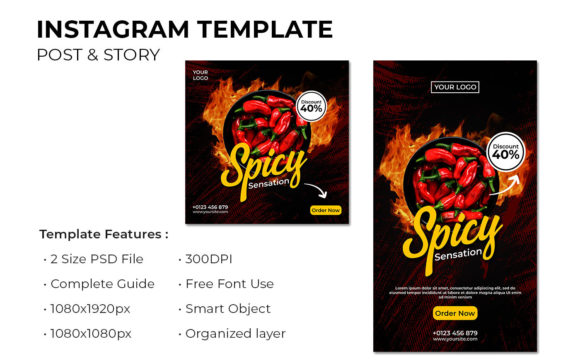
The true power of a professional template lies in its use of Smart Objects. A Smart Object is a container within Photoshop that holds an image while preserving its original source data. In the context of a spicy food template, the image placeholders are pre-configured as Smart Objects. This feature allows users to simply double-click the placeholder, paste their own photo of a fiery curry or spicy taco, save the file, and watch as the new image automatically fits into the design with all necessary scaling and masking applied. There is no need to manually resize, crop, or distort images, ensuring that the final output remains crisp and professional at 1080×1080 pixels for posts or 1080x1920 pixels for stories.
Navigating Organization: Layers, Groups, and Efficiency
One of the most common frustrations for non-designers is opening a complex file and finding a disorganized mess of unnamed layers. A premium template distinguishes itself through rigorous organization. Every element in the file should be layered by name group. This means that text elements, background shapes, overlay effects, and image containers are logically categorized.
For example, a layer group might be named "Headline Text," containing the specific font layer for the title. Another group, "Image Container," would hold the Smart Object for the food photography. This level of organization ensures that even a beginner can navigate the file with confidence. It eliminates the guesswork of finding which layer controls the shadow effect or where to change the background color. When a file is this structured, editing becomes an intuitive process rather than a technical hurdle, allowing the creator to focus on the content—the spicy food itself—rather than the mechanics of the software.
Customization: Colors, Fonts, and Brand Identity
While the structure provides the skeleton, customization provides the soul. A versatile template allows for full editing of images, text, and colors. Spicy food evokes specific emotions—heat, excitement, intensity—which are often represented by warm colors like reds, oranges, and deep yellows. However, every brand has its unique voice. A template that allows you to adjust the color palette ensures that your posts align with your specific branding guidelines.
Similarly, typography plays a massive role in setting the tone. Is your brand playful and fun, or sophisticated and gourmet? Access to free fonts included in the template package, or the ability to swap in your own licensed fonts, gives you complete control over the message. The text layers in these templates are fully editable, meaning you can change "Spicy Chicken Wings" to "Volcanic Tacos" in seconds. This flexibility ensures that the template serves as a long-term asset rather than a one-time solution.
Optimizing for Platforms: Posts vs. Stories
Modern social media strategies require content tailored to different formats. An Instagram Post typically utilizes a square aspect ratio (1080×1080 px), which is ideal for the main grid and evergreen content. In contrast, Instagram Stories demand a vertical format (1080x1920 px) designed for full-screen mobile viewing. High-quality template packs usually include both formats, ensuring a seamless experience across the platform.
It is also important to note the technical specifications regarding resolution. Professional templates are often set to RGB 300 dpi. While screen display technically only requires 72 dpi, starting with a higher resolution ensures that the graphics remain sharp even if they are repurposed for print materials like menus, flyers, or promotional posters later on. This future-proofs your design assets, giving you more value for your investment.
Common Misunderstandings and Best Practices
A frequent point of confusion for new users is the inclusion of images in template packages. It is vital to understand that images are not included in the download. The photos seen in preview mockups are for demonstration purposes only. Users must supply their own high-quality photography. This is actually a benefit, as it forces the creator to use authentic imagery that represents their actual product, which resonates better with audiences than generic stock photos.
Another assumption is that one needs advanced Photoshop skills to use these files. While familiarity with the software helps, the presence of Smart Objects and organized layer groups significantly lowers the barrier to entry. Most templates come with a Help File that walks users through the basic steps of replacing images and editing text. By following these instructions, even those with minimal design experience can produce results that look like they were created by a professional agency.
The Role of Templates in Modern Content Creation
In the broader context of digital marketing, time is a scarce resource. Small business owners and independent creators often wear many hats, acting as chef, marketer, and photographer simultaneously. Utilizing a pre-designed, editable template streamlines the workflow, reducing the time spent on design from hours to minutes. This efficiency allows creators to maintain a consistent posting schedule, which is a critical factor in algorithmic success on Instagram.
Moreover, these templates encourage creativity rather than stifling it. By removing the technical burden of setting up margins, choosing font sizes, and balancing color theory, the creator is free to experiment with different food photography angles, lighting setups, and caption strategies. The template acts as a reliable frame, ensuring that no matter how experimental the content gets, the final presentation remains polished and professional.
Ultimately, whether you are promoting a new line of hot sauces, documenting a street food tour, or managing the social media account for a spicy noodle bar, the right design tools make all the difference. A well-organized, fully editable PSD template with smart object capabilities provides the perfect foundation. It bridges the gap between amateur snapshots and professional marketing materials, empowering anyone to tell their spicy food story with clarity, style, and impact. By embracing these tools, creators can focus on what they do best: creating incredible food and sharing the passion behind it with the world.