Strategic Design for Mobile Apps Promotion Thumbnails and Web Banners
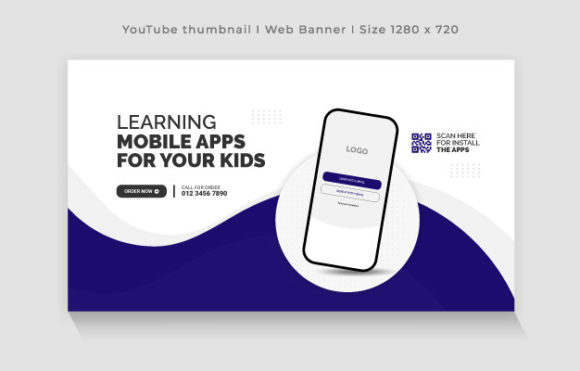
In the crowded digital marketplace, the difference between a user scrolling past your product and clicking to learn more often comes down to a single visual element. A Mobile Apps Promotion Thumbnail is not merely a decorative image; it is a critical communication tool that bridges the gap between your application's functionality and the user's immediate needs. When executed with strategic intent, these assets—whether deployed as app store thumbnails or web banners—serve as the primary interface for your brand's value proposition. Utilizing a fully editable template in EPS format, sized at 1280×720 pixels with RGB color at 300 DPI, provides the technical foundation necessary to adapt this communication across various channels without sacrificing quality or brand consistency.
The decision to invest time in crafting a high-quality promotional thumbnail should be viewed through the lens of long-term branding and customer acquisition costs. For entrepreneurs, marketers, and small business owners, the initial impression formed by a thumbnail can dictate the trajectory of a launch campaign. A well-organized, easy-to-edit template allows teams to iterate rapidly, testing different messaging angles and visual hierarchies to see what resonates best with their target audience. This agility is essential in an environment where user attention spans are shrinking and competition is fierce.
Aligning Visual Assets with Strategic Goals
Before opening any design software, it is imperative to define the specific goal of the Mobile Apps Promotion Thumbnail. Is the objective to drive immediate downloads, educate users about a new feature, or reinforce brand recognition among existing customers? The answer to this question determines the visual strategy. A template that offers full editability empowers you to tailor the design to these specific outcomes rather than settling for a generic aesthetic.
Consider the planning phase as an opportunity to align the thumbnail with broader operational goals. For instance, if your app solves a complex productivity problem for freelancers, the thumbnail should visually communicate efficiency and clarity. If the app is a hobbyist tool for creative enthusiasts, the imagery should evoke inspiration and possibility. By treating the thumbnail as a strategic asset rather than an afterthought, you ensure that every pixel serves a purpose in guiding the user toward a desired action.
- Clarity of Message: Ensure the core benefit of the app is visible within the first two seconds of viewing.
- Brand Consistency: Use fonts and colors that match your existing brand guidelines to build trust.
- Call to Action: Even in a static image, the design should imply a next step, such as "Download Now" or "Learn More."
- Contextual Relevance: Adapt the imagery to fit the platform where it will be displayed, whether it's a social media feed or a website sidebar.
The Technical Advantage of High-Resolution Editable Templates
The technical specifications of your design assets play a subtle but significant role in perceived quality. A Mobile Apps Promotion Thumbnail created at 1280×720 pixels in RGB color ensures that the image looks crisp on high-definition screens, from desktop monitors to modern smartphones. The 300 DPI resolution, while traditionally associated with print, indicates a level of detail and vector precision that translates well when scaling down for digital use, ensuring edges remain sharp and text remains legible.
Using an EPS (Encapsulated PostScript) file format offers distinct advantages for professionals who need flexibility. Unlike raster images that can become pixelated when resized, EPS files are often vector-based or contain vector elements, allowing for infinite scalability without loss of quality. This is particularly useful when repurposing a thumbnail design for a larger web banner or a smaller social media icon. The "well-organized" nature of a professional template means that layers are logically named and grouped, making it easy for anyone on the team—from a graphic designer to a marketing manager—to make quick adjustments without breaking the layout.
Furthermore, the inclusion of free fonts in the template removes a common barrier to entry. Licensing issues can delay campaigns and create legal risks for businesses. By providing a design that utilizes freely available typography, the template ensures that the project can move forward immediately, regardless of budget constraints. This practical consideration supports faster decision-making and smoother operations.
Decision-Making Frameworks for Effective Deployment
Knowing when and how to deploy your Mobile Apps Promotion Thumbnail is just as important as the design itself. Randomly posting visuals without a cohesive strategy can dilute brand messaging and confuse potential users. Instead, adopt a structured approach to deployment that considers the user journey.
For example, during a pre-launch phase, the thumbnail might focus on building anticipation, using teasers and countdowns. Once the app is live, the focus should shift to demonstrating utility and social proof. In the growth phase, the design might highlight specific features or user testimonials. This evolutionary approach ensures that the visual content remains relevant and engaging over time.
- Audit Current Assets: Review existing thumbnails and banners to identify inconsistencies or outdated messaging.
- Define Key Performance Indicators (KPIs): Determine what success looks like, whether it's click-through rates, conversion rates, or brand recall.
- A/B Testing: Create variations of the template with different headlines or color schemes to test performance.
- Feedback Loops: Gather input from users and stakeholders to refine the design based on real-world reactions.
Mitigating Risks Through Intentional Design
One of the primary risks of using promotional templates without a clear strategy is the potential for generic, forgettable content. If a Mobile Apps Promotion Thumbnail looks like every other app in the category, it fails to differentiate the product. To avoid this, it is crucial to inject unique brand personality into the template. This might involve customizing the color palette to stand out against competitors or using unique imagery that reflects the specific niche of the app.
Another risk is misalignment with the target audience. A design that appeals to corporate professionals may not resonate with teenage gamers. Understanding the demographics and psychographics of your audience is essential before finalizing the design. The ease of editing in a well-organized template allows for rapid pivots if initial assumptions about the audience prove incorrect. This flexibility reduces the risk of wasted resources on ineffective campaigns.
Additionally, relying solely on the template without considering the context of placement can lead to poor results. A thumbnail designed for a dark-mode website might look washed out on a light-mode blog. Always preview your designs in the actual environments where they will appear to ensure optimal visibility and impact.
Enhancing Productivity and Creative Workflow
For freelancers, agencies, and in-house marketing teams, time is a valuable resource. A high-quality, fully editable template streamlines the creative workflow, allowing designers to focus on strategy and customization rather than building layouts from scratch. This efficiency gain can be redirected toward more high-value activities, such as market research, copywriting, or campaign analysis.
The "well-organized" structure of the template also facilitates collaboration. When multiple stakeholders are involved in the approval process, a clean file structure makes it easier to track changes and implement feedback. This transparency fosters better communication and ensures that the final output aligns with the collective vision of the team.
Moreover, the ability to quickly generate variations of a Mobile Apps Promotion Thumbnail supports a culture of experimentation. Teams can test different hypotheses about what drives engagement without incurring significant time or financial costs. This data-driven approach to design leads to continuous improvement and better long-term results.
Long-Term Value and Brand Equity
Ultimately, the consistent use of high-quality promotional assets contributes to the accumulation of brand equity. Every time a user sees a professional, coherent Mobile Apps Promotion Thumbnail, it reinforces the perception of the app as a reliable and valuable tool. Over time, this consistency builds trust and loyalty, which are essential for sustainable growth.
Investing in a versatile template is an investment in the future of the brand. As the app evolves and new features are added, the template can be adapted to reflect these changes, ensuring that the visual identity remains current and relevant. This longevity makes the initial effort of setting up the template highly cost-effective in the long run.
In conclusion, the Mobile Apps Promotion Thumbnail is a powerful lever in the machinery of digital marketing. By approaching its creation and deployment with strategic foresight, technical precision, and a deep understanding of the audience, businesses can maximize the impact of their promotional efforts. The availability of fully editable, high-resolution templates removes technical barriers, allowing creators to focus on what truly matters: connecting with users and delivering value. Whether you are a startup founder launching your first product or an established enterprise refreshing your campaign, the principles of intentional design and strategic planning remain the same. Use these tools wisely, and let your visuals do the heavy lifting in telling your app's story.